

Quick Answer
To do SEO for an ecommerce website, start by researching the search terms your customers use when looking for products. Organize your website into clear categories, optimize product and category pages, improve loading speed and mobile usability, and fix crawling or indexing issues. Add relevant internal links, descriptive product images, and appropriate structured data. Finally, monitor organic traffic, search impressions, rankings, and sales to identify opportunities for improvement.
Introduction
Launching an online store is only the first step toward attracting customers. Even with an attractive design and quality products, shoppers may struggle to find your website if its pages are not optimized for search engines.
This is where ecommerce website SEO becomes important. It helps search engines understand your products, categories, and website structure while making it easier for potential customers to discover your store through relevant searches.
However, ecommerce SEO involves more than adding keywords to product descriptions. Online stores often have hundreds of URLs, product variations, filters, and competing category pages. Without a clear strategy, these elements can create duplicate content, indexing problems, and missed opportunities to attract qualified traffic.
This guide explains how to improve SEO for an ecommerce website through practical steps, from keyword research and on-page optimization to technical SEO and performance tracking.
1. Start With Ecommerce Keyword Research
Ecommerce keyword research identifies the words and phrases potential customers use when searching for products. It also helps you understand whether searchers want information, product comparisons, or a page where they can purchase something.
A strong ecommerce SEO strategy targets relevant searches at different stages of the buying journey.
Identify different types of search intent
Consider an online store selling running shoes.
| Search query | Likely intent | Suitable page |
| Best running shoes for beginners | Research and comparison | Buying guide |
| Men’s waterproof running shoes | Product discovery | Category page |
| Brand X Trail Runner Model Y | Specific product | Product page |
| How to choose running shoes | Informational | Educational blog |
This distinction matters because sending every visitor to the homepage may not satisfy what they are looking for.
Find relevant long-tail keywords
Long-tail keywords are more specific search phrases that can reveal a shopper’s needs.
Examples include:
- Lightweight running shoes for beginners
- Waterproof hiking boots for wide feet
- Organic cotton baby blankets
- Ergonomic office chairs for small spaces
Use keyword research tools, search suggestions, competitor analysis, customer questions, and your website’s search performance data to discover relevant terms.
Assign one primary search intent to each important page. Closely related keywords can be incorporated naturally where they fit.
Practical tip: Create a keyword map that connects each target search term to a specific URL. This helps prevent multiple pages from competing for the same search intent.
2. Build a Clear Ecommerce Website Structure
Your website structure affects how shoppers navigate your store and how search engines discover relationships between pages.
Google recommends making important ecommerce pages accessible through crawlable links. Its guide to helping Google understand ecommerce website structure explains why navigation and internal links matter.
Organize products into logical categories
A straightforward structure might look like this:
- Homepage
- Clothing
- Men’s Clothing
- Men’s Jackets
- Men’s T-Shirts
- Men’s Clothing
- Footwear
- Running Shoes
- Hiking Boots
- Accessories
- Backpacks
- Water Bottles
- Clothing
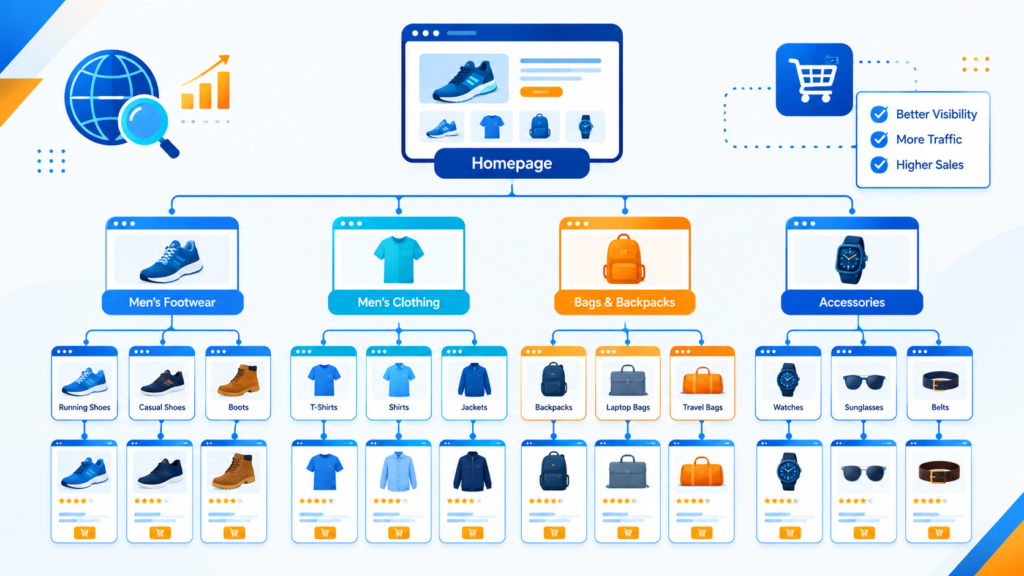
This hierarchy makes it easier for customers to move from a broad category to a specific product.
Follow these structure best practices
- Keep category names clear and descriptive.
- Link important category pages from your main navigation.
- Ensure product pages can be reached through crawlable links.
- Use readable, consistent URLs.
- Add breadcrumb navigation where it helps users understand their location.
- Avoid creating unnecessary category levels that make navigation confusing.
For example, /running-shoes/ is generally easier to understand than a long URL containing several unrelated folders and parameters.
A well-planned structure also supports future expansion as your product catalog grows.
3. Optimize Ecommerce Category Pages
Category pages can attract shoppers who know what type of product they want but have not selected a particular item.
Effective ecommerce category page SEO helps these pages match relevant searches while supporting product discovery.
Write useful category content
A category page should do more than display a grid of product images.
Include a descriptive heading, a brief introduction, useful filters, and product listings that match the category. Where it adds genuine value, provide additional guidance about materials, sizes, features, or choosing the right product.
For example, a category page targeting waterproof hiking boots could explain the differences between waterproof membranes, sole grip, and ankle support.
Avoid adding lengthy generic paragraphs simply to include more keywords. Content should help shoppers make decisions.
Improve category page optimization
- Use a unique title tag and H1 heading.
- Include relevant category keywords naturally.
- Write a concise, helpful introduction.
- Display relevant products prominently.
- Add links to meaningful subcategories.
- Use descriptive image alt text.
- Keep pagination and filter navigation accessible.
- Check whether important category pages are indexable.
If two category pages serve essentially the same purpose, review whether both are necessary. Consolidating overlapping pages may be more useful than publishing additional near-identical categories.
4. Improve Ecommerce Product Page SEO
Product pages are often the most commercially important URLs in an online store. They need to help search engines understand the product and give shoppers enough information to make an informed purchase.
Create unique product titles and descriptions
Use a clear product title that identifies the item and includes relevant attributes where appropriate.
Weak example:
“Premium Shoes”
Improved example:
“Men’s Waterproof Trail Running Shoes”
Write original descriptions that explain product benefits, materials, dimensions, compatibility, care instructions, and other useful details. Avoid copying manufacturer descriptions across every product page.
For example, instead of saying “high-quality backpack with multiple pockets,” explain the backpack’s capacity, laptop compartment size, water resistance, and intended use when those details are accurate.
Optimize essential product page elements
| Element | Recommended approach |
| Title tag | Clearly identify the product and its distinguishing features |
| H1 heading | Use a clear, descriptive product name |
| Description | Explain real features and benefits in original wording |
| Product images | Use clear, relevant images from useful angles |
| Alt text | Describe meaningful visual information accurately |
| Product URL | Keep it readable and consistent |
| Internal links | Connect to relevant categories and complementary products |
| Availability | Display accurate stock information |
| Reviews | Show genuine customer feedback where available |
Do not invent product specifications, ratings, or testimonials. Accurate information builds trust and helps customers choose the right item.
For additional implementation guidance, Google’s SEO Starter Guide covers descriptive titles, useful content, links, and image optimization.
5. Improve Product Images and Loading Speed
Product images help shoppers evaluate appearance, quality, and suitability. However, large or poorly optimized image files can slow down an ecommerce website.
Follow image optimization best practices
- Use sharp, appropriately sized product images.
- Compress images without noticeably reducing quality.
- Consider modern formats such as WebP or AVIF when supported.
- Use descriptive filenames instead of default camera-generated names.
- Add meaningful alt text to informative product images.
- Avoid repeating the same keyword unnaturally in every image description.
- Implement responsive images for different screen sizes.
- Lazy-load suitable below-the-fold images without delaying important initial content.
For example, blue-leather-wallet-front.webp is more descriptive than IMG_8421.webp.
Google’s image SEO best practices explain how relevant images, descriptive alt text, and discoverability support image search.
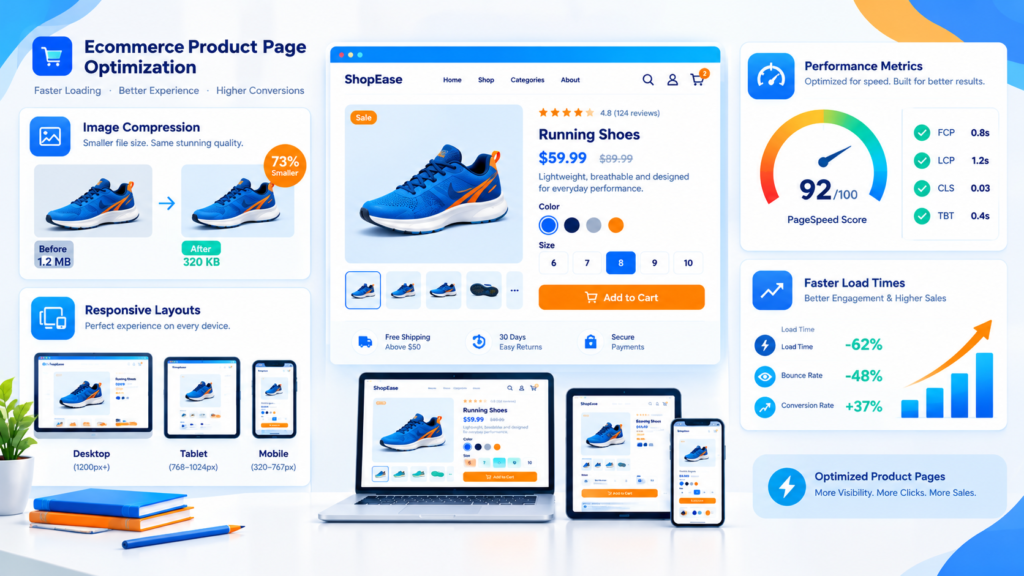
Check mobile usability and performance
A mobile-friendly ecommerce website should make it easy to browse products, select variations, read prices, and complete checkout on a small screen.
Review loading performance, layout stability, tap targets, navigation, and checkout usability. Google’s Core Web Vitals provide useful measures of loading performance, responsiveness, and visual stability.
Do not assume that a fast homepage means every product and category page performs well. Test representative templates individually and prioritize issues that affect important landing pages.
6. Fix Technical SEO Problems
Technical SEO for ecommerce websites helps search engines access, interpret, and index the pages that matter.
Large product catalogs can generate thousands of URLs through filters, sorting options, pagination, and product variants. Without appropriate controls, search engines may spend time crawling pages that provide little additional value.
Audit crawling and indexing
Use Google Search Console and a website crawler to identify:
- Important pages that are not indexed.
- Product URLs returning errors.
- Broken internal links.
- Incorrect canonical tags.
- Accidental noindex directives.
- Redirect chains and unnecessary redirects.
- Pages blocked from crawling unintentionally.
- Sitemap entries pointing to outdated or noncanonical URLs.
Check important URLs with Search Console’s URL Inspection tool to understand how Google sees them.
Submit an XML sitemap
An XML sitemap lists URLs you want search engines to discover. For ecommerce stores, it can be particularly helpful when product catalogs are large or pages change frequently.
Include important, canonical URLs that you want indexed. Keep the sitemap updated as products are added, removed, or replaced, and submit it through Google Search Console.
A sitemap supports discovery but does not guarantee that every listed page will be indexed.
Manage duplicate content with canonical tags
Product variants, sorting parameters, and filter combinations can create multiple URLs with similar or identical content.
For example, a product might be accessible through several URLs generated by category paths or tracking parameters.
Use consistent internal links and appropriate canonical tags to signal the preferred URL when duplicate or substantially similar versions exist. However, canonical tags are signals rather than absolute commands, and they should not be used to conceal genuinely different pages.
For products with distinct variants, follow Google’s ecommerce URL guidance and ensure each variant’s URL and canonical configuration reflect your intended indexing strategy.
Control faceted navigation
Filters for color, size, price, and brand improve the shopping experience, but every possible combination does not necessarily deserve a separate search result.
Decide which filter combinations offer meaningful search demand and unique value. Make intentional indexing decisions for those pages, and prevent low-value URL combinations from creating an unnecessarily large crawl space.
Google’s documentation on managing crawling of faceted navigation URLs provides detailed guidance.
7. Add Relevant Ecommerce Structured Data
Structured data helps search engines interpret information on your pages. Depending on eligibility and Google’s systems, product markup can support richer search appearances.
For ecommerce stores, relevant types may include:
- Product for product information.
- Offer for details such as price and availability.
- AggregateRating when qualifying review data is present.
- BreadcrumbList for page hierarchy.
Use accurate information that matches what visitors can see on the page. Do not mark up fabricated reviews, unavailable offers, or misleading product details.
Google distinguishes between product snippets and merchant listing experiences. If customers can purchase products directly from your website, review the requirements for merchant listings rather than assuming that every product markup configuration serves the same purpose.
Start with Google’s official guide to structured data for ecommerce websites, then validate your implementation with the relevant testing tools.
Important: Structured data makes eligible pages easier to interpret, but it does not guarantee enhanced search results or higher rankings.
8. Strengthen Internal Linking
Internal linking connects related pages and helps visitors discover more products and useful information.
For example, a blog post about choosing hiking boots could link to the hiking boots category. That category could link to individual products, while product pages could link to relevant accessories.
Useful internal linking opportunities include:
- Homepage to priority category pages.
- Category pages to relevant products and subcategories.
- Product pages to complementary items.
- Buying guides to relevant categories and products.
- Related educational articles to supporting resources.
Use descriptive anchor text that explains the destination. Avoid filling paragraphs with repetitive exact-match keywords.
Internal links should be helpful rather than purely algorithmic. Make sure important pages are not isolated from the rest of the site.
9. Create Helpful Content Around Your Products
Not every shopper is ready to purchase immediately. Some want to compare alternatives, understand product features, or solve a problem before deciding what to buy.
Educational content helps your store address those needs.
Depending on your catalog, useful topics might include:
- How to choose the right running shoes.
- What to consider before buying an office chair.
- Product A versus Product B: key differences.
- How to care for leather accessories.
- A practical guide to choosing a backpack for travel.
Each article should address a distinct search intent and link naturally to relevant products or categories.
Avoid publishing large numbers of nearly identical articles that offer little original value. Prioritize accurate explanations, practical advice, and product information that helps readers make decisions.
A coordinated approach to search engine optimization services can help businesses plan keyword targeting, content development, technical improvements, and performance measurement together.
10. Measure Results and Improve Your SEO Strategy
SEO requires ongoing evaluation. Rankings alone cannot tell you whether your store is attracting the right visitors or generating sales.
Use Google Search Console to review search impressions, clicks, click-through rates, queries, and indexing information. Use an analytics platform, configured appropriately, to measure ecommerce events and purchases.
Monitor the following metrics:
| Metric | What it helps you understand |
| Organic clicks | How many visits arrive through unpaid search results |
| Search impressions | How often your pages appear in search results |
| Click-through rate | How frequently impressions lead to clicks |
| Product page traffic | Which product pages attract organic visitors |
| Conversion rate | How often visitors complete a desired action |
| Organic revenue | The revenue attributed to organic search under your analytics model |
| Index coverage | Whether important URLs are being indexed as intended |
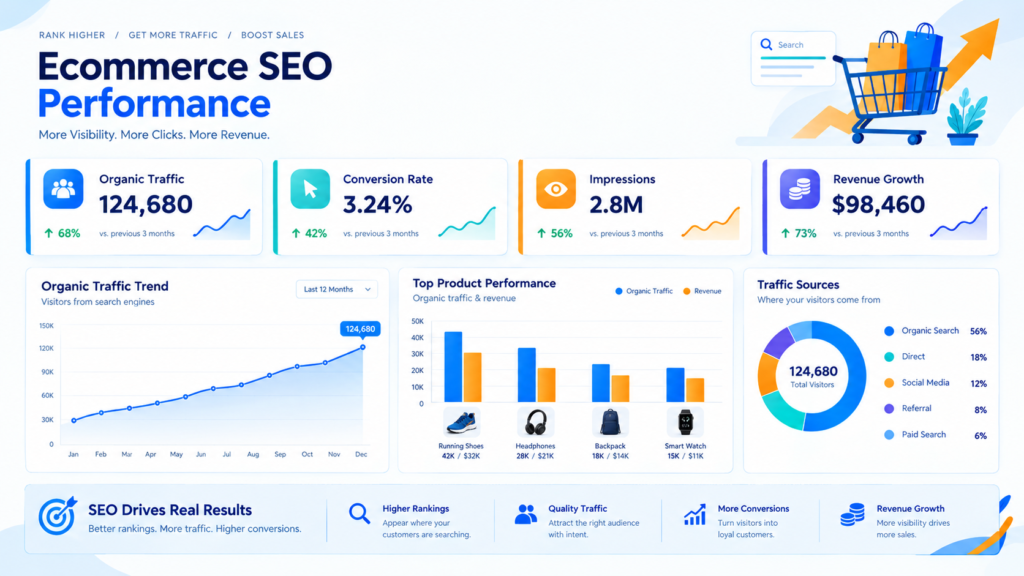
Review performance by page type, product category, device, and search intent. A category page with many impressions but few clicks may need a clearer title or a better match to the searcher’s expectations. A product page receiving traffic but generating few purchases may need clearer product information, better images, or a more usable buying experience.
Change one set of elements at a time where practical, record what you changed, and assess the results over an appropriate period.
Common Ecommerce SEO Mistakes to Avoid
Even a well-designed store can lose search opportunities through preventable issues.
Watch out for these common mistakes:
- Copying manufacturer descriptions across multiple products.
- Targeting the same search intent with competing pages.
- Allowing filter combinations to generate excessive low-value URLs.
- Blocking important product pages from crawling.
- Forgetting canonical tags on duplicate or variant URLs.
- Publishing outdated prices or availability information.
- Ignoring mobile usability and loading performance.
- Adding structured data that does not match visible content.
- Removing discontinued products without considering useful redirects or replacement pages.
- Measuring traffic without evaluating conversions or business value.
Prioritize problems according to their impact. Fixing a widespread indexing issue may be more important than adjusting a minor wording detail on one product page.
Conclusion
Learning how to do SEO for an ecommerce website involves combining keyword research, clear site architecture, useful product and category content, technical SEO, and consistent performance monitoring.
Start with the pages most important to your business. Make sure search engines can discover them, help shoppers understand the products, and remove technical obstacles that prevent valuable pages from appearing in search results.
Then expand your efforts through relevant educational content, thoughtful internal links, accurate structured data, and regular analysis of organic traffic and sales.
If your store needs a more coordinated plan for improving search visibility, KPTL Web Solution offers search engine optimization services to help businesses address content, technical, and on-page SEO priorities. For stores that also need improvements to their shopping experience, explore ecommerce web design services.
SEO does not guarantee a particular ranking or timeline. A consistent, evidence-based approach gives your ecommerce website a stronger foundation for long-term organic discovery.
Frequently Asked Questions
1. How do I improve SEO for an ecommerce website?
Start with keyword research and map search intent to the correct product, category, and informational pages. Improve titles and descriptions, optimize images, strengthen internal linking, fix technical problems, and monitor results in Search Console and your analytics platform.
2. How long does ecommerce SEO take to show results?
The timeline varies according to competition, website history, technical condition, content quality, and the work completed. Some changes can improve discovery relatively quickly, while meaningful ranking and traffic improvements may take months. No provider can guarantee a specific outcome or timeline.
3. How do I optimize ecommerce product pages for SEO?
Write unique and accurate product descriptions, use descriptive titles, provide useful images with appropriate alt text, display current product details, and link to relevant categories or complementary products. Add valid product structured data where appropriate and ensure the page is accessible to search engines.
4. How can I fix duplicate content on an ecommerce website?
First identify why duplicate URLs exist. Then choose the appropriate solution, which may include consolidating similar pages, implementing canonical tags, correcting internal links, or controlling low-value filter URLs. Do not automatically canonicalize genuinely different products to one page.
5. Do product schema and structured data improve rankings?
Structured data helps search engines understand product information and can make eligible pages qualify for certain enhanced search appearances. It does not guarantee rich results or directly guarantee higher rankings. Implement the correct markup and follow Google’s documentation.
6. How can I increase organic traffic to an ecommerce website?
Build a technically sound website, target relevant search intent, optimize important category and product pages, publish useful supporting content, and strengthen internal linking. Use performance data to prioritize improvements that attract relevant shoppers and support purchases rather than focusing on traffic volume alone.